 Carlos E. Torres
MyKeepass 2.0: Rewritten From Scratch, and Now Free
Five years after shipping the first version to the Mac App Store, I rewrote MyKeepass from the ground up on my own KDBX implementation. Here is what the rewrite bought me, why the format is the hard part, and why version 2.0 is free.
August 31, 2026 · 6 min read


Think of a password manager as a keyring. The keys are the easy part. What decides whether you keep using it is how fast the right one comes out of your pocket while you are holding two bags of groceries.
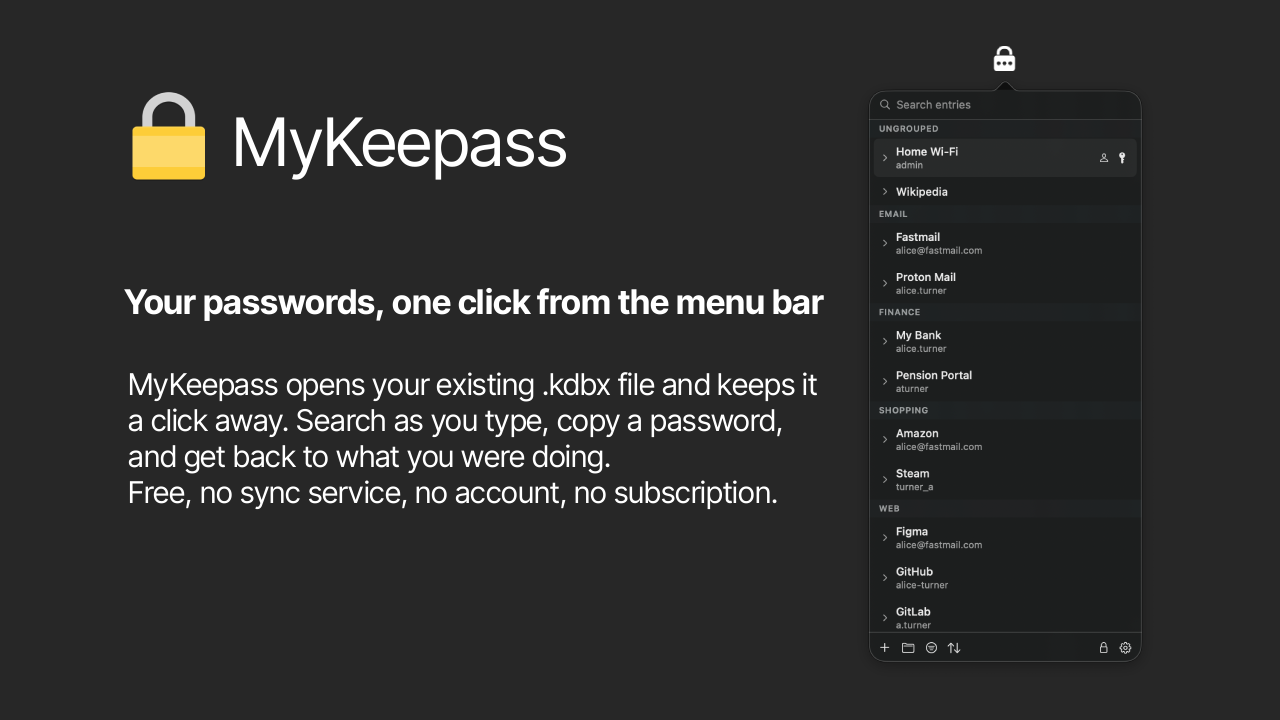
That was the whole idea behind MyKeepass when I started it in 2021. I did not want another vault with a Dock icon and a window and a launch animation. I wanted my KeePass database one click away in the menu bar, searchable, copyable, and then gone.
Version 1.0 shipped to the Mac App Store at $4.99 and did that job for five years. Version 2.0 is a complete rewrite, it does considerably more, and it is free.
What 1.0 got right, and what it did not
The first version was deliberately small. Open a .kdbx file, list the entries, click to copy, add and edit and delete, manage groups, sort, launch at login. It collected nothing, phoned nowhere, and fit in 7.7 MB. One reviewer described it as basic and local, which was exactly the pitch, and that is still the pitch.
The reviews also told me precisely where it fell short. Search was missing at launch and someone quite fairly said the app was close to useless without it. I added it in 1.3. Another reviewer asked for the search field to sit at the top of the menu rather than behind a click, because when you search constantly, one extra click is the entire interaction. Both of those notes are now baked into the top of the 2.0 panel, where the field filters as you type across title, username, URL, notes and group name.
What I could not fix incrementally was underneath.
Why a rewrite instead of a refactor
Everything the app can safely do is bounded by how well it understands the KDBX format. Not "can it open the file," which is the easy 80 percent, but "can it write that file back without quietly losing something a different app put there."
That is the part that keeps you up at night. A password database is not a document you can regenerate. If the app drops an attachment, mangles a custom field, or flattens the entry history while saving an unrelated edit, the user finds out weeks later when they need the thing that is gone. There is no undo, and there is often no other copy.
Once I decided that MyKeepass had to be trustworthy at that level, the honest answer was that I needed to own the format layer end to end rather than trust a black box with the only copy of someone's credentials. So 2.0 is built on its own KDBX implementation, written from scratch.
What owning the format actually buys
Concretely, 2.0 reads and writes KDBX 3.1 and 4.x. It handles Argon2id, Argon2d and AES-KDF for key derivation, AES-256 and ChaCha20 for the cipher, and key files in every format KeePass accepts. That is the full modern surface of the format rather than a comfortable subset of it.
More importantly, it preserves what it does not own. Attachments, custom fields, entry history and anything written by another client survive untouched when you edit something unrelated in the same file. Your database stays a shared document, so KeePassXC, KeePass 2, KeePassium and Strongbox all keep working on it.
That claim is worth exactly as much as its test suite, so here is mine: every file the app writes gets opened by KeePassXC in tests, across both format versions and all supported ciphers. If interoperability is the promise, the other implementation has to be in the loop, not my own reader agreeing with my own writer.
Pro tip: Put your .kdbx in iCloud Drive and point MyKeepass at it on the Mac and KeePassium or Strongbox at it on iPhone. You get sync across devices with no sync service, no account, and no company holding your vault. The file is the protocol.
The features that came with the new foundation
With the format layer under my control, the 2.0 feature list is mostly things that were previously either impossible or unwise.
Touch ID unlock, with an option to keep the master password in the keychain, so the common case is a fingerprint instead of a long passphrase typed in front of whoever is next to you.
Change the master password of an open database directly from Settings, which requires rewriting the header and re-deriving the key, and which I was not going to build on a foundation I did not fully understand.
Auto-lock after an idle period and when the Mac sleeps, plus an explicit close-database command. The menu bar makes an app easy to forget, and an unlocked vault you forgot about is the failure mode that matters.
Clipboard hygiene. Copied passwords are marked confidential, so clipboard managers and Universal Clipboard skip them instead of syncing your banking password to every device on your Apple ID, and they clear themselves after a timeout you choose.
Built-in update checks, since the app now lives outside the App Store and has to tell you about new versions itself.
The rest is still the same shape as 1.0, by design. No Dock icon, no windows, no onboarding, no account. Sandboxed, signed with a Developer ID, notarized by Apple, and reaching the network only to check for updates. Your database never leaves your machine.
Why it is free now
Version 1.0 cost $4.99 on the App Store. Version 2.0 is a free, signed and notarized DMG downloaded straight from the MyKeepass page.
Two reasons.
The first is the audience. The people who choose KeePass over a subscription vault have already decided that owning their data matters more than convenience. Charging five dollars at the door filters out a chunk of exactly the people this app is for, and the revenue was never the reason I maintained it.
The second is distribution. Leaving the App Store means I ship fixes the day they are ready rather than the day they are approved, I control the update channel, and I can use the entitlements the app actually needs. The tradeoff is that I now owe you the trust the App Store used to underwrite, which is why the signing, the notarization, the sandbox and the KeePassXC verification are all stated plainly on the page instead of assumed.
MyKeepass 2.0.2 is out now. It needs macOS 13 Ventura or later, runs natively on Apple silicon and Intel, and opens the database you already have.
Five years is a long time between versions. The thing I keep taking away from this one is that the rewrite was never about the feature list. Every feature I wanted turned out to be blocked by the same missing thing, which was a format layer I understood completely. Build that, and the features stop being hard.