 Carlos E. Torres
Building a Local TTS Pipeline with Kokoro For My Blog Posts
Using Kokoro, an 82 million parameter model, on my laptop to narrate every post on this site, for free, offline. The interesting part was never the model. It was everything around it: HTML extraction, the text cleaning rules nobody warns you about, and one Python version that cost me an evening.
August 11, 2026 · 11 min read


Think of a text-to-speech model as a voice actor who is extremely talented, completely literal, and has never seen a website. Hand them a web page and they will read your navigation menu, your cookie banner, your footer copyright, and then spend forty uninterrupted seconds pronouncing curly braces.
The model is not the hard part. The script is.
Every post on this site now has an audio version, generated locally on my laptop, at zero marginal cost, by an 82 million parameter model. This is how that pipeline works, why I built it the way I did, and the two mistakes that cost me the most time.
Why pre-generate instead of speaking in the browser
The first fork in the road is whether to synthesize on demand in the reader's browser or to generate a file when you publish.
The browser-native speechSynthesis API is tempting. It is about twenty lines of JavaScript and costs nothing. It is also a mess in practice. The voices are whatever the operating system happens to ship, so a reader on Windows Chrome and a reader on Safari get meaningfully different experiences. iOS has long-standing quirks with long text that force you to chunk manually. You cannot cache it, cannot measure it, and cannot put it on a CDN.
Pre-generating at publish time inverts every one of those properties. A blog post is finite and static. You pay once per post rather than once per listener. The output is just a file, so it caches, syndicates, and could become a podcast feed later without any new infrastructure.
That decision is easy. The next one is where it gets interesting.
The cost argument is not the real argument
The obvious move is a hosted API. OpenAI's tts-1 runs about $15 per million characters, with the HD tier at $30. A 1,500 word post is roughly 9,000 characters, so you are looking at something in the neighborhood of fourteen cents. A hundred posts would cost less than a decent lunch. ElevenLabs sits well above that on the API, in the range of $0.06 to $0.18 per thousand characters, and even there the total is not going to change anyone's life.
So if it is that cheap, why run it locally?
Because the marginal cost is not what constrains you. The friction does.
When each render costs money and a network round trip, you generate once and accept the result. When it costs nothing and runs offline, you regenerate freely: try four voices, tweak an awkward sentence, adjust the pause length between paragraphs, run it again. That loop is where the quality actually comes from. Free does not save you fourteen cents. Free changes how many times you are willing to press enter.
That is the thesis of this whole build, and it is the same argument I keep making about local models generally. The economics are a footnote. The iteration loop is the point.
Why Kokoro
I landed on Kokoro-82M, and the numbers are truly strange.
It has 82 million parameters and ships under Apache 2.0, meaning commercial use with no permission required. In the run-up to its release it ranked first in the TTS Spaces Arena, beating models many times its size, including XTTS v2 at 467M parameters and MetaVoice at 1.2B. The v1.0 release ships 54 voices across 8 languages, outputs 24 kHz audio, and the weights come in around 327MB, small enough to run comfortably on a laptop CPU with no GPU at all. The model card puts the total training cost at roughly $1,000 of A100 time.
An 82M parameter model outperforming a 1.2B one suggests the scaling curve for traditional TTS is steeper than the field assumed. That is a research-interesting result on its own. For my purposes it meant something more practical: I could put a good narrator entirely inside my publish workflow with no API key, no rate limit, and no vendor.
One warning before you go looking. The model card notes that several lookalike domains selling "Kokoro TTS" are likely scams. The real weights live only on Hugging Face under hexgrad/Kokoro-82M.
The honest limitations: preset voices only, no cloning, and it is a raw model rather than a product. You are expected to build the pipeline around it.
On voices, I landed on am_puck after auditioning several. The default af_heart is the warmer, more approachable read and it is the right pick for a lot of writing. For technical posts I wanted something a little flatter and more even, because these pieces are long and dense and a voice with more personality gets tiring around minute six. This is exactly the kind of decision you only make well if regenerating is free.
Which brings us to the actual work.
The pipeline, end to end
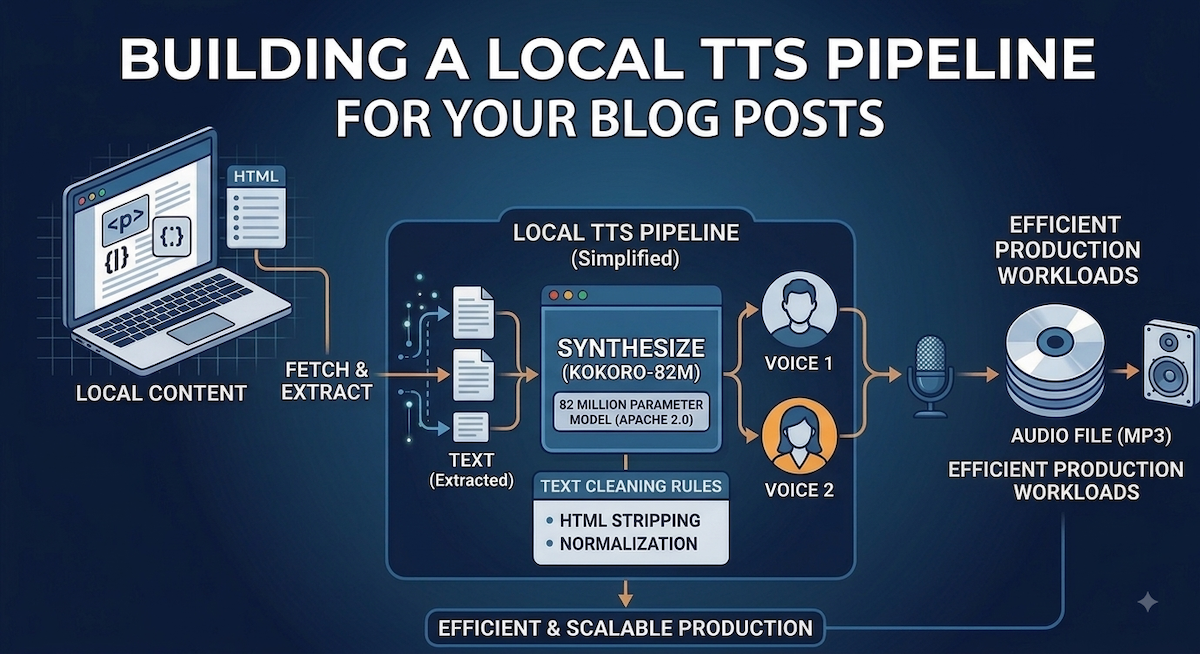
My script is post_audio.py. It takes a URL and produces an MP3. Six stages:
1. Fetch. Plain HTTP GET on the published post. I deliberately narrate the live page rather than the source Markdown, because the published page is what readers actually get, including any last-minute edits.
2. Extract. BeautifulSoup with a list of candidate selectors: article, main article, main, [role="main"], then common class names like .post-content and .prose. Crucially it does not take the first match. It scores every match by text length and takes the longest, because on a lot of sites main wraps both the article and a sidebar, and the first structural hit is frequently the wrong one. If nothing clears a 200 character floor it falls back to body, and a --selector flag overrides the whole thing.
3. Strip. An explicit junk-tag list gets removed before extraction: script, style, noscript, nav, header, footer, aside, form, button, svg, iframe, figure, picture. With one exception that I added after losing content: any junk tag containing a pre is spared. Code blocks live inside figure elements often enough that blanket removal was quietly deleting them before the code handler ever ran.
Then block elements get collected in document order, with a guard against reading anything twice. A list item inside a blockquote would otherwise be extracted once as part of the quote and again on its own, so each consumed node is tracked and any descendant of an already-consumed node is skipped.
4. Clean. This is the stage that determines whether the audio is listenable. More on it below.
5. Synthesize. Kokoro's KPipeline, paragraph by paragraph rather than in one shot, with 400ms of generated silence between segments. Paragraph-level chunking keeps memory predictable and, more importantly, gives the narration a breathing rhythm that continuous synthesis does not. It also gives me per-paragraph progress output, which matters more than it sounds when a long post takes a few minutes.
6. Encode. Concatenate, write a WAV at 24 kHz, then shell out to ffmpeg for a VBR MP3 with the post title written into the ID3 metadata, and delete the intermediate WAV.
One small thing that pays for itself: the title is pulled from og:title, falling back to <title> and then the first h1, and prepended to the narration as its own spoken line. The audio announces what you are listening to. Podcast apps and browser tabs both do this for you, but a bare MP3 sitting in someone's downloads folder does not.
The cleaning rules nobody warns you about
This is where I spent most of my time, and where the difference between "technically it produced audio" and "someone would actually listen to this" lives.
Code blocks become a placeholder. Replaced with "Code sample omitted." Nothing kills a listen faster than a voice enunciating def train(): followed by a curly brace. Consecutive code blocks collapse into a single placeholder rather than repeating the phrase four times. There is a --keep-code flag for the rare case where the code is the point.
Bare URLs become the word "link." A raw URL read character by character is unbearable and conveys nothing.
Headings and list items get terminal punctuation added. This one is subtle and it matters a lot. A heading has no period, so the synthesizer runs it straight into the following sentence with no pause, and the structure of the post disappears. Adding a period is a one-line change that restores the entire outline to the listener. Blockquotes needed the same treatment.
Inline code stays. A sentence like "the posts collection" reads fine. Only block-level code gets stripped.
Typographic quotes get normalized to straight ones. Curly apostrophes and smart quotes are correct on the page and a liability in the phonemizer, where they occasionally get treated as characters rather than punctuation. Non-breaking spaces get folded into regular ones for the same reason. Both are one-line regex substitutions and both fix defects you would spend an hour chasing otherwise.
Pro tip: Install
espeak-ngalongside Kokoro. It handles the pronunciation fallback for out-of-vocabulary words, which for a technical blog means most of your proper nouns. Without it, product names come out mangled in ways you will not notice until you are listening in the car.
The two-step workflow that makes it usable
The single most valuable design decision was separating extraction from synthesis.
# Step 1: see exactly what the narrator will say
python post_audio.py https://cetorres.com/blog/some-post --dry-run
# Step 2: render from the text file, after editing it by hand
python post_audio.py --text-file audio/some-post.txt --voice am_puck --format mp3
The dry run writes only a .txt file. I read it, fix any sentence that reads well but speaks badly, and then render from that file. This sounds minor. It is not.
The two steps round-trip cleanly because the title is the first line of that text file. Rendering from the file recovers the title from line one and strips the trailing period, so the MP3 metadata comes out right whether I fetched the page or edited the text by hand.
It means fixing an awkward line takes five seconds instead of a full refetch and re-render. It means I can try three voices against the same cleaned text without touching the network. And it makes the pipeline debuggable, because when the audio is wrong I know immediately whether the problem is in extraction or in synthesis. Those are two very different bugs and conflating them wastes hours.
Any pipeline with a slow expensive stage at the end should have an inspectable artifact in the middle. That is not a TTS insight, it is just good engineering, but TTS is where it bit me hard enough to internalize it.
The Python version that ate an evening
Now the part I wish someone had told me.
pip install kokoro failed on my machine, and the error was nowhere near the actual cause. Kokoro pins numpy==1.26.4. That version has no prebuilt wheels for Python 3.14, so pip fell back to building numpy from source, which failed on Cython and header conflicts, then backtracked through progressively older dev builds producing an ever more confusing wall of output.
The error message talked about Cython. The problem was my Python version.
This is a well-documented general pattern: installing an older pinned numpy on a newer Python than it supports produces a build failure that has nothing to do with your actual project. The fix is boring and immediate. Create a dedicated Python 3.12 environment:
brew install python@3.12
python3.12 -m venv .venv && source .venv/bin/activate
# or, faster
uv venv --python 3.12
Rule I now follow: any ML dependency gets its own pinned-version virtual environment on day one, before the first install. The five minutes that costs is cheaper than any single debugging session it prevents. If you want to stay on newer Python, kokoro-onnx runs through ONNX Runtime instead of PyTorch and has looser version constraints, at the cost of a slightly different API.
What I would tell you to steal
If you are building something similar, three things carry over regardless of which model you pick.
Separate extraction from synthesis, and write the intermediate text to disk. Treat text cleaning as the main engineering problem rather than a preprocessing afterthought, because it is where all your listening quality comes from. And pin your Python version before you pin anything else.
The thing I have not used yet but keep thinking about: Kokoro's language codes include Brazilian Portuguese alongside American and British English, and my script already exposes it as a --lang flag. Publishing Portuguese narration of posts I wrote in English is a translation problem rather than a synthesis one, but the voice side is already solved and sitting there waiting.
The model was the easiest decision in the entire project. Kokoro downloads, runs, and sounds good, and that took an afternoon. The other three weekends went into figuring out what the voice should actually say.
That ratio is not unusual. It is what building on top of a capable model almost always looks like.